 Knowledge hub
 Articles


 14 min read
Key Takeaways
- HR teams are already putting workforce data into Claude and Copilot, with or without an approved AI policy. A ban moves that work onto exported spreadsheets and personal accounts where nobody can see it.
- Many organizations say no to AI on people data because they do not have answers yet. That default leaves the business case unexamined and the actual usage ungoverned.
- Governance and risk teams answer for compliance with the EU AI Act and GDPR. HR gets to a yes faster when it answers their questions before the meeting.
- Bring one narrow use case, ideally the work people already do with AI, with concrete answers to six questions. A general request for “AI access” gets a general no.
Your people data is already in Claude and Copilot
If your HR team has access to Claude or Copilot, some of your workforce data is probably in it already. That is true whether or not your company has an official AI governance policy.
The reason is simple. The use case is obvious. HR teams spend hours every week answering routine questions about headcount, turnover, span of control and pay ranges. An AI assistant answers those questions in seconds, explains the trend and drafts the summary for the business leader. Once someone has seen that work, they do not go back to building pivot tables by hand.
The use goes well beyond quick data questions. HR professionals load data extracts, charts and screenshots of reports into Claude or Copilot and ask it to synthesize the findings, analyze a trend or interpret what changed and why. Then they ask it to turn that analysis into the slides for a leadership review, the email to a business leader explaining the attrition numbers, or the talking points for a workforce planning meeting. Work that took hours now takes minutes, and the people doing it notice.
We have been talking with HR and people analytics teams since August 2026, and the same story keeps coming up. Employees export HR reports and load them into Copilot or Claude Code themselves, outside any approved setup. They do this because the tool is open on their screen, the question is on their desk, and there is no approved route.
Saying no does not stop it
Many companies respond to AI on people data with a flat no. In most cases they have not assessed the use case and found the risk too high. They simply do not have answers yet, and no is the safe default while they wait. One HR team we spoke with faced another three months of review before it could use AI on workforce data. It decided to go live with AI switched off and revisit the question later. That decision has two consequences.
First, nobody evaluates the business case. HR business partners keep spending their time on data requests instead of workforce planning and coaching leaders. Managers keep waiting days for numbers they could have had in a minute. Second, the usage continues anyway, with fewer controls. An exported report pasted into a chat window has no access permissions, no audit trail and no agreed metric definitions. It may sit in a personal account on a service the company has never reviewed. The organization ends up carrying more risk than a governed setup would create, and it gets less value.
If people will use AI on workforce data regardless, the practical move is to regulate that use. Give HR an approved route with clear limits, and bring the usage into a place where the company can see and control it.
Understand what your governance board answers for
HR has its part to do as well. Governance and risk teams say no for specific reasons, and HR gets a better outcome when it understands those reasons before asking.
These teams know the regulation in detail. Under the EU AI Act, AI systems used for recruitment, decisions about promotion and termination, task allocation and performance evaluation fall in the high-risk category. Breaching the obligations for high-risk systems can cost up to EUR 15 million or 3% of worldwide annual turnover. GDPR adds its own requirements on lawful basis, data minimization, international transfers and automated decision-making, with fines up to EUR 20 million or 4% of turnover. When something goes wrong, the governance board is the group that has to explain it.
The intended use decides how much of this applies. An assistant that answers aggregated headcount questions raises different issues from one that ranks employees for promotion. Human review matters, but it does not automatically take a system out of the high-risk category.
So the board needs to know exactly what AI will do, which data it can reach and how the company will control its use. An HR team that arrives with a request for a tool and no specifics gives the board nothing to assess. The usual result is a no or a long review. An HR team that arrives with answers gives the board something it can approve.
The six questions to answer before you walk in
Answer these for the specific use case you want approved. Each one matches a concern your governance board already has on its list.
1. What will AI do, and who makes the decisions?
List the questions AI will answer and how HR will use the answers. This is the question that decides whether your use case lands in the EU AI Act high-risk category. For anything touching hiring, pay, promotion, performance or termination, name who reviews the AI output, who can challenge it and who stays accountable for the decision.
Be explicit about automated decision-making. Under Article 22 of GDPR, employees have the right not to be subject to a decision based solely on automated processing that significantly affects them, such as a rejection, a dismissal or a pay outcome. A manager who approves an AI recommendation without examining it does not count as human involvement, and the EU Court of Justice’s SCHUFA ruling found that a score a decision-maker relies on heavily can itself be the decision. Employee consent rarely works as a legal basis here, because of the imbalance of power between employer and employee.
So state in your proposal whether AI output feeds any decision about an individual. If it does, describe what the human reviewer sees, what authority they have to overrule the output and how an employee can contest the outcome. If it does not, say so in writing, because a use case limited to aggregated questions about teams and departments largely stays outside Article 22. For high-risk systems, the EU AI Act also requires employers to inform workers’ representatives and affected employees before the system goes into use.
2. Which data can AI access?
Bring a list of the data sources, fields and employee populations in scope. State what is excluded, especially health, absence reasons and other special category data. Document where the data is processed and how long it is retained. A board will not approve “our HR data” as a scope.
Be precise about anonymized versus pseudonymized data, because your board will be. Under GDPR, anonymized data falls outside the regulation only if nobody can reasonably re-identify the person behind it. Replacing names with employee IDs is pseudonymization, and pseudonymized data is still personal data with every obligation that comes with it. Workforce data is hard to anonymize, since a combination of job title, department, location and hire date often points to one person. State which of the two you are proposing, how re-identification is prevented and whether AI receives record-level data or only aggregated results. Limiting the AI tool to aggregated results is the simplest way to reduce what the board has to assess.
3. How are access permissions enforced?
A manager should see only their own team. An HR business partner should see only their assigned population. Those rules must apply to AI answers as well. Rewording a question should never return data the person cannot see in a dashboard. An exported spreadsheet pasted into a chat window has no permissions at all, which is the gap the board is worried about.
4. How will AI answers match official reporting?
Headcount, turnover and span of control need one definition each. If AI gives one turnover figure and the board deck shows another, someone has to explain the difference, and trust in both numbers drops. Shared calculations and stated reporting periods make AI answers verifiable.
This is where pasted spreadsheets cause the most confusion. Turnover alone has several defensible definitions: voluntary or total, with or without interns and contractors, divided by starting, ending or average headcount. When an employee loads an export into a chat window, the AI picks a definition on the spot, so two people asking the same question can get two different answers. Propose a setup in which AI uses the company’s agreed metric definitions instead of calculating its own.
5. What happens to prompts and answers?
The prompts themselves are personal data. “Why did Jan’s performance rating drop?” or “Compare the pay of the three engineers in Lisbon” names or singles out employees. GDPR applies to the prompts and the answers in full. An employee can request them in a subject access request, and they may have to be produced in an employment dispute.
Where the prompts go depends mostly on the type of account:
| Setup | Prompts used to train models? | Who holds the contract |
| Claude Free, Pro or Max (personal account) | Only if the user turns on the “Help improve Claude” setting, with retention of up to 5 years when on (Anthropic) | The individual employee |
| Claude Team, Enterprise or the Claude API | Not covered by the consumer setting; commercial terms apply | The company |
| Microsoft 365 Copilot or Copilot Chat with a work (Entra ID) account | Not used to train foundation models; prompts and responses are logged for audit and eDiscovery (Microsoft) | The company |
| Copilot with a personal Microsoft account | Consumer terms and settings apply | The individual employee |
This is where the legal exposure sits. An HR employee who pastes an export into a personal account has put employee data under terms the company never signed. There is no data processing agreement, no company control over retention and possibly a transfer outside the EU without a legal basis. On a company account, the vendor acts as a data processor under an agreement your legal team has reviewed.
So bring the board the product and plan name, confirmation that users sign in with company accounts only, the data processing agreement, the training and retention terms, the processing location and whether personal AI accounts are blocked on company devices.
6. How are individuals and small groups protected?
Set minimum group sizes and aggregation rules so answers cannot expose one person’s pay or performance. A threshold alone is not enough. A series of overlapping questions can isolate an individual even when every single answer meets the minimum group size. Show how you test for that.
Together, these answers give the board something specific to evaluate. They also show HR where its existing data controls need work before AI goes live.
Put a governed layer between AI and people data
The six questions are hard to answer when workforce data sits in an HRIS, payroll, an ATS, learning systems, engagement surveys, finance systems and spreadsheets. Each source has its own definitions and access rules. Connecting an AI tool directly to each of them adds another place where permissions and calculations have to be managed. A governed data layer between the AI tool and the source systems answers most of the questions in one place.
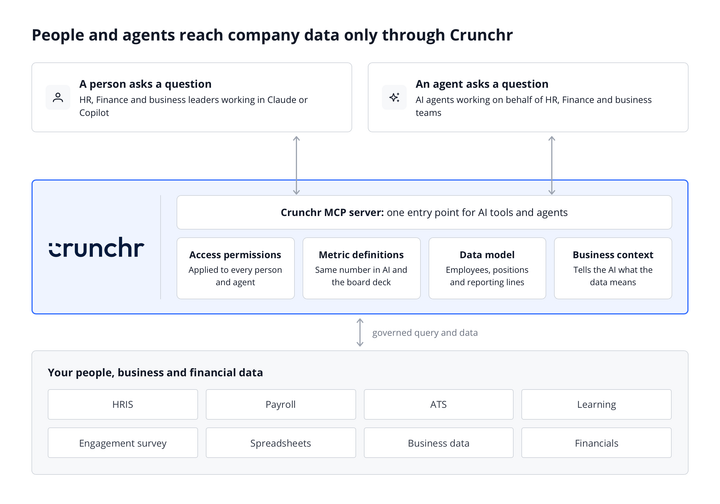
Governed data layer · people and agents, Crunchr MCP, eight datasources
Crunchr brings people, business and financial data from different sources into one consistent structure. Its data model is built around employees, positions and reporting lines, so AI works with workforce information instead of disconnected tables. Crunchr holds the metric definitions, so turnover or span of control means the same thing in an AI answer as in the board deck. It also enforces governance and access permissions. People working in Claude or Copilot and AI agents both connect through the Crunchr MCP server and never reach the source systems directly. Crunchr applies the permissions of the person or agent asking before returning only what they are authorized to see. HR, Finance and business teams then work from the same governed data.
That gives HR a clear story for the governance board: where the data comes from, how each metric is defined and how access is controlled when someone asks AI a question.
Make the first approval the work people already do
Give the board one paragraph on where this goes. HR business partners stop spending their week on data requests and spend it on workforce planning and coaching leaders. Later, managers and agents get workforce answers directly within their permissions, and HR stays involved where judgment is needed.
Then ask for a narrow first approval, and make it the work your people already do. Your HR team is loading exports, charts and screenshots into Claude or Copilot to analyze trends and draft slides and emails. The first request is to move that work onto a governed route. The board then chooses between a governed version of this work and the ungoverned version it already has.
Take a fictional company with 3,000 employees. Its people analytics lead knows the HR business partners already paste turnover exports into Claude to prepare leadership reviews. She proposes a pilot in which they do the same work through company accounts connected to governed workforce data. Her proposal answers the six questions like this:
| Question | The pilot’s answer |
| 1. What will AI do, and who decides? | Analyze aggregated trends and draft slides and emails. No input into decisions about individuals. The HR business partner owns every output. |
| 2. Which data can AI access? | Headcount, turnover, span of control and pay ranges, aggregated only. No health data, absence reasons or individual pay. |
| 3. How are permissions enforced? | Each HR business partner sees only their assigned business unit, the same as in their dashboards. |
| 4. Do answers match official reporting? | AI uses the same metric definitions as the board deck. |
| 5. What happens to prompts and answers? | Company accounts only, under commercial terms and a data processing agreement. Prompts are not used for training. |
| 6. How are small groups protected? | Minimum group size of 10, plus a test of whether repeated questions can isolate one person. |
After the pilot, HR uses the results to support its next request, whether that means more users, more data or a new use case such as manager self-service. The board approves one step while seeing how it fits the longer plan.
Next steps
- Find out where AI is already being used on workforce data in your HR team. That usage is your strongest evidence that a governed route is needed.
- Pick one use case people already do with AI, limited to aggregated data and a defined user group.
- Write down your answers to the six questions for that use case.
- Review the access rules on your existing dashboards and fix anything too broad.
- Ask your governance or risk lead for 30 minutes to review the draft before the formal submission.
Where this fails
This approach fails in a few specific situations. If your current dashboards give people overly broad access, connecting AI carries those permissions forward, and the board will find it. If the pilot has no evaluation criteria, you will have no evidence for the next request. If the first use case touches promotion, pay or performance decisions, expect a full high-risk assessment instead of a quick approval.
FAQ
People data can include sensitive information about employees. Governance boards need to understand what AI will do with that data, who can access it, how it is processed, and what controls are in place before approving its use.
Personal AI accounts may operate under terms the employer has not reviewed or approved. Uploading workforce data can create risks around data retention, access, processing, and the organization’s ability to monitor its use.
A specific use case, the data AI can access, user permissions, decision-making responsibilities, how answers will be validated, and safeguards for prompts and employee information.
Limit AI access to authorized workforce data, apply role-based permissions, and use aggregation rules. Minimum group sizes help, but repeated questions must also be tested for potential disclosure of individual information.
Start with work HR already performs, such as analyzing aggregated turnover or headcount trends and preparing leadership reports. A narrowly scoped pilot gives the governance board a concrete proposal to evaluate.
 Share on X

 Share on Facebook